v1.0 — NOW AVAILABLE

NOS-DOS

Boot fast. Work clean. Remember when computing just worked?

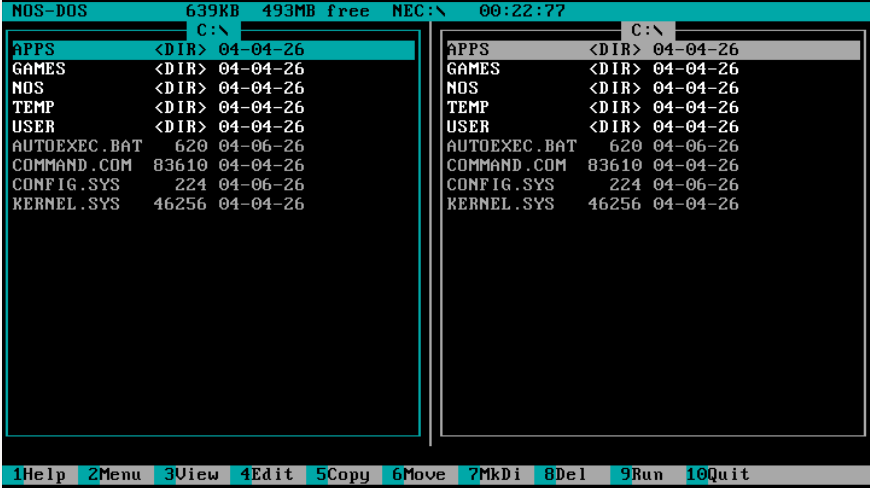
NOS-DOS is a curated, ready-to-run DOS environment built on FreeDOS — optimized for virtual machines. Import the OVA, boot, and you're running a properly configured DOS system with networking, a real package manager, and a dual-pane shell. No configuration required.

Download v1.0 View Source
NOS-DOS v1.0 — NOS-SHELL
NOS-SHELL 1.0 C: 28.4MB free   H:
[ C:\APPS ]
[..]
[WP51 ]
[LOTUS ]
[GAMES ]
COMMAND .COM 93K
AUTOEXEC.BAT 1K
CONFIG .SYS 1K
[ C:\NOS\SYSTEM ]
[..]
DETECT .EXE 42K
NOSMEM .EXE 18K
SHELL .EXE 15K
JEMMEX .EXE 115K
NOS-HW .CFG 1K
 
WP51 — WordPerfect 5.1 F9:Launch
F1Help
F3View
F4Edit
F5Copy
F6Move
F7MkDir
F8Del
F9Launch
F10Quit
F12DOS

Everything you need. Nothing you don't.

>_

Dual-Pane Shell

Norton Commander-style TUI with F-key operations, file viewing, directory navigation, and a built-in launcher.

HW

Auto-Configuration

First boot detects your VM's hardware and generates the correct CONFIG.SYS and AUTOEXEC.BAT automatically.

MEM

Memory Profiles

One command switches between STD / MAX / EMS / GAME presets, all targeting 620 KB+ free conventional memory.

PKG

Package Manager

Install classic DOS software by name. NPKG INSTALL WP51 downloads, extracts, and registers the app.

NET

Integrated Networking

mTCP-based networking with one-command DHCP setup. Ping, FTP, IRC, web browsing, and time sync built in.

H:\

Host Bridge

Shared folder auto-mount maps to H:\. Copy files in and out, print to PDF via the host, sync clipboard.

CPU

CPU Throttle

Tame modern VM speed for timing-sensitive games. Live hotkey adjustment (Ctrl+Alt+KP+/-) with per-game presets.

Game Launcher

NOSPLAY applies the right memory profile, throttle preset, and sound settings before launching any game.
Up and running in two minutes.

  1. Download the OVA Get nosdos.ova from the download section below.
  2. Import into VirtualBox File → Import Appliance → select nosdos.ova → Import. Takes about 30 seconds.
  3. Start the VM Select NOS-DOS and click Start. You'll be at the NOS-SHELL in under 10 seconds.
  4. Get networking Press F12 to open a DOS prompt, then type NNET DHCP.
  5. Install software NPKG UPDATE refreshes the package list.
    NPKG SEARCH word finds word processors.
    NPKG INSTALL WP51 installs WordPerfect 5.1.
  6. Launch an app Press F9 in NOS-SHELL, select from the launcher, press Enter.

VMware users: import the VMX bundle. QEMU users: run ./run-qemu.sh. See the README for full details.

NOS-DOS v1.0

VIRTUALBOX
nosdos.ova
Full appliance. Import and go. Includes NAT networking and shared folder pre-configured.
Download OVA
VirtualBox 6.1+
VMWARE
nosdos-vmware.zip
VMX + VMDK bundle for VMware Workstation or Fusion. Shared folder via HGFS.
Download VMX
Workstation 16+ / Fusion 12+
QEMU / BARE METAL
nosdos.iso + nosdos.hdd
Bootable ISO + raw HDD image. Launch script included. Works on Linux, macOS, Windows.
Download IMG
QEMU 7.0+ (i386)

All downloads are ~32 MB. SHA256 checksums in the release notes. Source code: github.com/your-org/nosdos.

Classic software, one command away.

28 packages in the repository at v1.0. Install with NPKG INSTALL <id>.

wp51WordPerfect 5.1
wstar7WordStar 7
galaxyGalaxy Write
xywriteXyWrite III+
lotus123Lotus 1-2-3
aseasyAs-Easy-As
scSpreadsheet Calc
dbasedBASE III+
foxproFoxPro 2.6
tp70Turbo Pascal 7.0
tc30Turbo C 3.0
qbasicQBasic 1.1
masmMASM 6.11
telixTelix 3.51
procommProComm Plus
nortonNorton Utilities
pctoolsPC Tools 9
xtreeXTree Gold
doomDOOM (shareware)
wolf3dWolfenstein 3D
keen1Commander Keen 1
princePrince of Persia
hereticHeretic (shareware)
duke3dDuke Nukem 3D
quakeQuake (shareware)
descentDescent (shareware)
tyrianTyrian 2000
doom2DOOM II (shareware)

Want to add a package? See the contribution guide.

What's under the hood.

COMPONENTDETAIL
KernelFreeDOS 1.3 (KERNEL.SYS + COMMAND.COM)
Memory managerJEMMEX v5.86 (XMS + UMB, EMS optional)
Mouse driverCuteMouse (CTMOUSE) v2.1
NetworkingmTCP 2025-01-10 (packet driver, DHCP, HTTP, FTP, IRC)
ShellNOS-SHELL — Open Watcom C, 16-bit real mode, ~15 KB
Package managerNPKG — archive.org + custom repo, 28 packages at v1.0
VM platformsVirtualBox 6.1+, VMware Workstation 16+/Fusion 12+, QEMU 7.0+
Disk image32 MB FAT16 (C:), 1.44 MB FAT12 floppy for boot ISO
Conventional memory620 KB+ free in STD profile
Boot time< 10 seconds to NOS-SHELL (QEMU: ~2.4s)
LicenseGPL-2.0